What Is a Local LLM (and Why People Suddenly Care)

This whole “local LLM” idea sounds intimidating at first, like something only hardcore engineers would touch. But strip away the jargon, and it’s actually pretty straightforward. You’re just running AI on your own machine instead of borrowing someone else’s server across the internet.
That’s it. Well, mostly.
And lately, more developers—and even regular users—keep circling back to the same question: is it worth it? I’d say yes… though it depends on what you value.
Key Takeaways
- Local LLM runs AI on your device, not the cloud.
- You get privacy, control, and offline access.
- Trade-off is setup complexity and hardware needs.
- Future is hybrid: local + cloud combined.
Owning Your AI Feels Different (In a Good Way)
When a Local LLM runs on your device, your data doesn’t wander off into the cloud. It stays put. Quiet. Yours.
That’s not just a nice-to-have. According to arXiv, local setups can improve privacy and reduce reliance on third-party systems. Which, if you’re handling sensitive files—medical notes, financial docs, even messy internal reports—actually matters more than people admit.
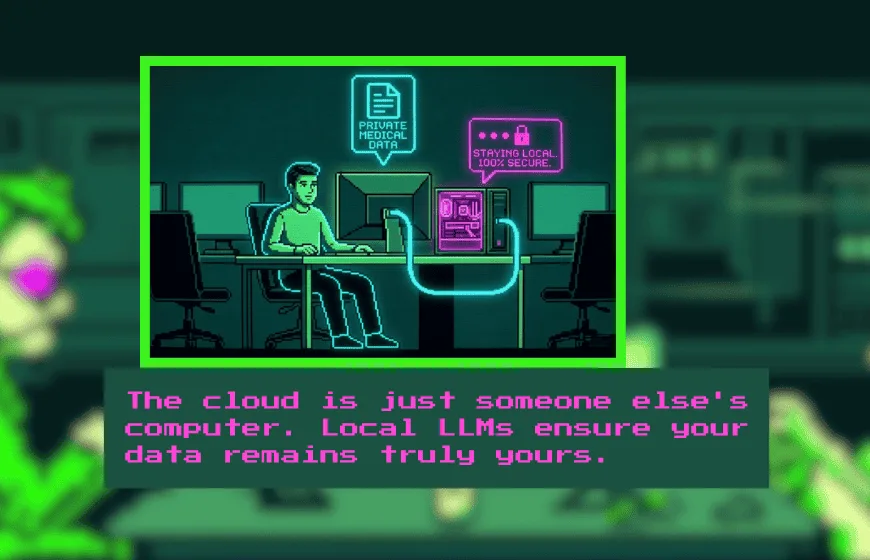
Think of it this way. Cloud AI feels like renting a car. Convenient, sure. But a Local LLM? That’s your own vehicle, dents and all, parked right outside.
You decide how it runs. You decide what it remembers. You even decide when it breaks (and yeah, it might).
That control hits different.
Privacy, Speed, and Tinkering Freedom (The Real Perks)
Now, let’s not sugarcoat it—people don’t switch to local models just for fun. There are real benefits, and they stack up quickly.
First, privacy. The ACLU has pointed out that cloud providers can access user data. With a local setup, that door basically shuts.
Then there’s speed. Not always blazing fast, but often quicker where it counts. No round trips to a server. No waiting on network hiccups.
And customization? That’s where things get interesting.
Local models offer more flexibility. You can tweak them, fine-tune them, break them a little, fix them again. It’s messy, but it’s yours. Not perfect. But powerful.
Local vs Cloud LLM (The Ongoing Tug-of-War)
Here’s where people get stuck.
Cloud models are easy. Open a browser, type a prompt, done. They scale well, too. No hardware headaches. No setup drama.
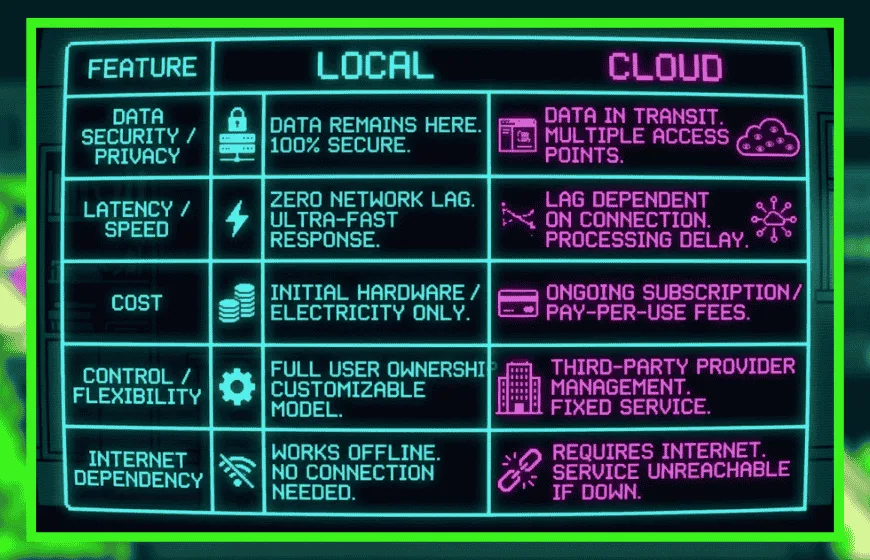
Local models? Different story. You’ll need decent hardware, some patience, and a willingness to troubleshoot when things inevitably go sideways. Local setups offer more control but come with added complexity.
So, what’s the trade?
Convenience versus control. Speed versus setup. Simplicity versus ownership.
Most people end up somewhere in the middle, whether they planned to or not.
Where Local LLMs Actually Show Up (Not Just Theory)
It’s easy to talk about this stuff in abstract terms, but real-world use is where it clicks.
Hospitals, for instance, use local models to process patient data without risking leaks. Finance teams analyze sensitive reports without sending anything outside their systems. These aren’t edge cases—they’re becoming normal.
Even smaller businesses are getting in on it. Customer support bots trained on internal docs, running locally, answering questions without touching the cloud. This setup works especially well in privacy-heavy environments.
And for individuals? Honestly, it’s kind of fun.
People use Local LLMs for writing help, coding tasks, even offline research. No internet? No problem. Well… mostly.
Setting One Up Isn’t Magic (But It’s Not Plug-and-Play Either)
If you’re thinking of trying it, here’s the rough path. Not perfect, but it works.
You pick a model—something like Llama or DeepSeek. Then install a runtime tool, maybe Ollama or LM Studio. After that, you’ll need enough RAM and, ideally, a decent GPU. Then comes downloading the model files and actually running them.
Simple on paper. Slightly chaotic in practice.
Experts like Neil Sahota point out that local AI needs both hardware and know-how. And yeah, that’s true. It’s not always smooth sailing.
But once it’s up and running? It feels solid. Predictable. Yours.
Where This Is All Headed (A Bit of a Guess, Honestly)
Local LLMs aren’t a passing trend. They’re part of a bigger shift.
Models are getting smaller. Hardware is getting better. And suddenly, things that needed servers a few years ago now run on a decent laptop. That’s… kind of wild when you think about it.
At the same time, cloud AI isn’t going anywhere. Big companies still need scale. Massive workloads don’t just disappear.
So we end up here. A hybrid world. Some tasks local, others in the cloud. It’s not neat, but it works.
A Local LLM isn’t just a tool. It’s a shift in control.
Instead of asking for intelligence from somewhere else, you run it yourself. Quietly. Directly. On your own terms.
And that, more than anything, is why people keep coming back to it.
FAQs
1. What is a local LLM?
A local LLM is an AI model that runs directly on your device instead of relying on remote cloud servers.
2. What are the benefits of local LLMs?
They offer better privacy, more control, offline access, and customization compared to cloud-based AI.
3. Local LLM vs cloud LLM—what’s the difference?
Local LLMs run on your hardware with full control, while cloud LLMs are easier to use but depend on external servers.
4. Do local LLMs require powerful hardware?
Yes, most require sufficient RAM and often a GPU to run efficiently.
5. Can you use a local LLM offline?
Yes, once installed, local LLMs can run without an internet connection.
6. How do you set up a local LLM?
You choose a model, install a runtime tool like Ollama or LM Studio, and run it on compatible hardware.
7. Are local LLMs better than cloud AI?
Not always. They are better for privacy and control, while cloud AI is better for convenience and scale.